 Let’s say your happily browsing the Internet and all of a sudden a window pops up and says that a system scan revealed that your computer is infected with some sort of spyware. Furthermore, you are redirected to a webpage that asks you to get the “full” version of the antivirus app that showed you that system alert. What’s weird though is you don’t recall installing that piece of software.
This is the method used by XP Smart Security 2010 to spread itself. It silently installs itself and a host of other malware into your computer, slowly compromising your system until they get what they want. It’s a miracle that you caught on its operation this early on since you still have time to fix it.
If you just ignored it and went on your merry way browsing and downloading as you like, you might have gotten into more trouble. Some of the side effects of having this rogue anti-spyware on your computer are sluggish performance, corruption of the system registry, slow internet connectivity and frequent hang-ups of your computer. Not only that, hackers might try to steal your personal information like your business account number, electronic bank statements and ATM pin codes. They also can turn your system into part of a botnet and use it as a gateway for illegal activities.
To get rid of this annoying and risky malware, see our steps below.
- Pothi
- March 24, 2010
- Comments Off
Read More
 If you haven’t realized it yet, that new anti-spyware program on your computer named XP Security Tool isn’t actually a security tool. It will redirect your browsing to sites that can infect you with more malware. It pesters you to update to a newer version for a fee. It also eats up system resources and sits on your memory, waiting for a chance to grab sensitive data.
Don’t even think of upgrading this software since it’s all a scam to get your money and financial information. It’s best your remove this software immediately before it runs amok in your computer trashing files, editing registry entries and disabling security software. Don’t get lax, you must erase this completely from your system before it deletes important files or worse, crashes your computer completely.
This is one of the nastiest malware out there since it doesn’t show up in virus scans on antimalware apps, disables other security features of your computer and can likely rebuild itself even if you remove it manually. Before you go ahead and reinstall Windows or ship off your computer to a shop, take a look below on how you can remove this malicious software and clean up your computer.
- Pothi
- March 24, 2010
- Comments Off
Read More
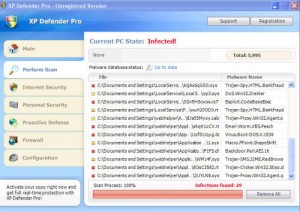 XP Defender Pro is one of the software you should avoid like the plague. It’s a fake anti-spyware app that will ruin your computer and the sensitive data within it. It starts like a regular security app but you’ll soon get irritated by its constant alerts on non-existent viruses or pop-ups forcing you to upgrade to a premium version. You’ll also experience a considerable slow down in the performance of your PC and might even find that your online accounts like webmail or Paypal have been compromised.
Don’t pay for any upgrades this applications asks from you. It won’t deliver a “full” version of the app or unlock any new, malware-cleaning features. On the contrary, the only thing this will unlock is a backdoor to your computer, letting all sorts of bad software in that can wreck your computer. The best course of action to take is to exterminate this pest of a program and clean out your computer of all its bugs.
One way is to reformat and reinstall Windows but we have a better solution. Read on and find out how you can delete this annoying and dangerous application from your computer.
- Pothi
- March 24, 2010
- Comments Off
Read More
 Fake anti-spyware are everywhere these days. Win 7 Security is one of them, a clone of XP Security geared toward Windows 7 machines. You might think it is a legitimate spyware application since it scans your drive and alerts you of infections. Don’t get fooled! All those alerts are fake and rather than helping you, it harms your computer by letting in Trojans and worms into your system.
This badware will keep constantly using up system resources, slowing down your computer. It’s also dangerous since it will open up your computer to intrusions by hackers and thieves who are out to get personal and private information from you like your home address, business account numbers and social security details. Ignore this malware at your own risk!
Unlike other malware, the operation of Win 7 Security is out in the open and rather than hide in the shadows of your hard drive, it will constantly nag you with alerts and ask for you to pay them to upgrade. This is all a ruse, they will take your money and run and give nothing in return.
While this software might be out in the open, uninstalling it won’t work. Also, deleting the program, using Windows’ Add/Remove Programs tool and running another antivirus software will normally not remove this malignant application. It will even hijack your Internet Explorer browser so you cannot use it to find a cure. Fortunately, there is a simple way to fix this. Read below and find out how to finally get rid of Win 7 Security.
- Pothi
- March 24, 2010
- Comments Off
Read More
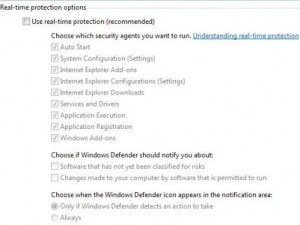 Does your computer seem slow when performing tasks today? Is there an annoying program constantly trying to scan your computer for viruses? Have you checked your free disk space and got a shock when you only had a few megabytes of storage left? These are just a few of the symptoms of an infection by a rogue anti-spyware app such as Vista Defender Pro.
Like other similar badware, Vista Defender Pro tries to gouge you by asking for a paid upgrade but delivering nothing in return. In fact, the only thing you can expect after paying for this fake software are more malware. And since you paid for the software, they know that you have valuable account information in your computer that they can siphon off you.
You might have gotten this malware unknowingly. A friend might have copied files from an infected flash drive. You might have inadvertently clicked on an ad you’re not supposed to. Or someone might have sent you an attachment that carried this software. What ever method it was, you can still fix your computer without resorting to reformatting or service fees. See our below solution to this problem.
- Pothi
- March 24, 2010
- Comments Off
Read More

Yet another malicious piece of software has hit the street. This time around it’s Vista Antimalware, a version of XP Antimalware and Win 7 Antimalware that targets PCs running Windows Vista. It might already be on your computer, annoying the heck out of you with its incessant pop-ups and virus alerts. This is one tough malware to crack since it sits in your system tray all day and won’t budge, constantly spewing fake virus announcements and nagging for you to upgrade to a paid version. We’ll say this up front right now: don’t pay for this software, it’s not real!
You may feel that your computer is slowing down even if you don’t have any programs running. Or your browser might be acting up, showing that certain sites have been infected with malware (courtesy of the Vista Antimalware alerts) when you’re just browsing to Google or YouTube. You might even find that some of your applications fail to start anymore. These are all signs that you need to clean up your computer, right away!
Before you go ahead and send your machine to a repair shop or reformat it yourself, there’s a simpler solution. Read on and find out.
- Pothi
- March 24, 2010
- Comments Off
Read More
 XP Antimalware is a fake antivirus tool specifically designed to attack Windows XP users. It has a very professional-looking GUI that could easily pass for a legit, useful program. Alas, it is nothing more than a deceitful malware that will try to entice you into purchasing a so-called “full version”.
Just like practically all fake antimalware programs, XP Antimalware can infect your system through trojans. Where can you find these trojans? In bogus websites, that’s where. I wouldn’t download anything from obscure websites if I were you … especially if the downloadable item comes in the form of a useful file like an mp3, video codec, device driver, or Flash player update.
Online scanners in similarly obscure websites are also possible sources of these dangerous trojans. Once the XP Antimalware gets inside your system, it will waste no time attacking your Windows XP registry. That way, it can gain control of your system immediately after your next boot up.
XP Antimalware is also just one of the many fake anti-malware that rely on ave.exe. We’ve talked about this treacherous little file in a very recent post here on this site. I suggest you have a look at it as well.
 Ever heard of Ave.exe? No, I didn’t mean av.exe. There’s not much difference between the two though. That’s right, ave (just like ‘av’) is just a member of a set of files that make up certain rogue programs.
Antivirus XP, XP Smart Security, XP Antimalware, XP Defender Pro, XP Security, Vista Antimalware, Total Vista Security, and Vista Defender Pro are just some of the many programs that require ave.exe in order to run. All of these programs are actually fake anti-spyware tools. That means, they’ll trick you into thinking they’ve got what it takes to remove certain spyware and other threats. But in reality, these programs are actually the threats!
Although you can remove Ave.exe manually (and we’ll show you how in a short while), the steps are pretty tricky. So I strongly suggest you go for automatic removal on this one.
Just like most fake-antispyware, the programs that rely on Ave.exe install themselves through trojans you might have downloaded from rogue sites. Therefore, beware of obscure websites that offer free downloads of video codecs, Flash player updates, or mp3s, as these sites may have a trojan ready to pounce on you. Once inside, they can attack you Windows registry and gain full control.
 If there’s one thing that makes me anxious every time I insert a flash disk into my computer’s USB port, it’s the thought of being infected by the Recycler Virus. I got hit by it once, and I can tell you, it was one very stressful experience.
The Recycler Virus takes advantage of the Windows Autorun feature in order to sneak into your computer. This feature is often used each time you insert a portable media into your PC or laptop. This means, DVDs, CDs, memory sticks, and USB drives are possible carriers of this malware.
Once the Recycler Virus is inside, it will immediately attack and alter your Windows registry. That way, it could easily launch during boot up. As a result, very few popular antivirus software can disable it; let alone detect it. What’s even worse is that the Recycler Virus can even be resistant to formatting. Before I knew how to remove it, I tried formatting my infected flashdisk at least six times before finally giving up.
Since the Recycler Virus copies itself to all active drives in your PC, it can eventually consume precious space. And since it will try to contact other malicious sites the moment you go online, your system can slow down to a crawl. All is not lost though. There’s a way to remove this stubborn malware.
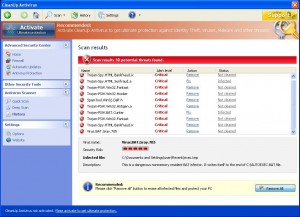 CleanUp Antivirus is the latest version of the rogue antispyware, Security Antivirus. It will constantly hound you with security alerts from your taskbar and even randomly redirect you to an alert webpage while you are surfing the Internet. It will also report that your system registry is infected with malware. Ignore all these alerts, they are all fake. They are there to force you to upgrade and pay for another version of their program, which is also fake.
Rogue software like this attempt to get you to pay for a better product, fooling you into getting software that will not help you but will only bring you more problems. In addition, if you do buy this product, they will steal your credit card details and possibly use it for evil purposes or sell it to other thieves. On the other hand, if you don’t pay for this but the badware is still in your computer, chances are your system can still be compromised and become infected by more serious infections.
Some of the other problems you might face if you have this malware in your system are frequent computer freeze ups, loss of free disk space, slow performance of other programs and sudden restarts of your PC. Get help immediately and clean up your computer!

