
Who would have thought that even anti-spyware would go green? Some hackers thought so and released the Earth Antivirus into the wild. Don’t be fooled; it’s not actually an antimalware app.
The typical modus of this software is to bombard you with pop-ups and virus alerts annoying you or scaring you until you pay to upgrade. Whatever you do though, do not send them any payment! Once they get their money, they are gone. And those viruses it supposedly found on your computer? Nothing but hoaxes so don’t worry about them.
To make matters worse, this software often puts your computer in a tight spot by placing various back doors in your system. This can become an avenue for other attacks on your computer from viruses to Trojans. Your precious personal and business information can be stolen under your nose by malicious programs. So you better get going on removing this badware as soon as possible.
Clean up your computer by going through our instructions below. You’ll surely have a spic and span PC after you do so.
- Pothi
- July 18, 2010
- Comments Off
Read More
 One of the many sneaky rogue anti-spyware apps plaguing the Internet is Antivir Solution Pro. Like its sibling Antispyware Soft, it spreads through illicit websites and tainted downloads from peer-to-peer networks. While it does require manual installation to invade your computer, you might inadvertently install it if you click on pop-ups from bogus websites selling online virus scanners.
Once it is in your system, it will create more pop-up that entice you to upgrade to a paid version. It uses scare tactics by saying your PC is infected by fake viruses that it has placed throughout your file system. If you’ve already paid for this, we suggest you immediately dispute the charge with your bank as this is not a legitimate application and will not clean your computer of any malware.
The reason that fake anti-malware programs should be removed immediately is that they disable removal tools and security applications once they get into your system. Furthermore, they compromise your system which can lead to other nastier malware getting in a wrecking havoc in your PC. It also opens a back door where malicious hackers can get in an steal personal information from you like your bank account numbers, credit card numbers and more.
You can easily remove this malware by following our instructions below.
 Antispyware Defender is another rogue anti-spyware to add to your watch list of apps to avoid. This type of software creeps into your computer through malicious websites and files you download from shady places. Once it installs itself, it will throw out a never-ending stream of pop-ups warning you about fake viruses that it supposedly scans for.
None of these are real though, just an elaborate plot to make you part with your money. So don’t pay for any upgrades it shoves in your face! If you want the pop-ups to stop though, you need to remove this scareware right away.
One of the side effects of having any sort of malware in your computer is that they compromise your security systems. You never know what doors they open for other malware to squeeze into. Before you know it, you might be losing cash from stolen bank credentials.
Stop the problem before it starts by wiping your computer clean of this malware. You might want to have this cleaned by a professional or maybe go an reformat your computer. You don’t need to though. Just try out our quick fix to solve it. Follow the instructions below for the solution.
- Pothi
- July 18, 2010
- Comments Off
Read More
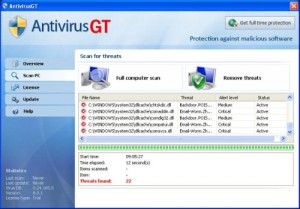 One of the problems with surfing the Internet is that sometimes, something springs up and you’re just blindsided by it. Take for example this situation: you’re browsing around looking for news on an upcoming game or album from your favorite band, then this pop-up leaps out into the center of your screen. It’s a security notification from a program called AntivirusGT– your computer’s infected and it offers to help you out by cleaning those files for a small fee. You’ve just been hit by malware and this is just the beginning.
Most people will know immediately that this is a scam – but AntivirusGT isn’t just aiming to get your money. What this particular piece of malware does is first make sure it’s hard to remove. Next, is to start creating random files and folders. It then installs a keylogger and tries to create a secure backdoor to an IRC server so it can send out information about you to whomever is controlling it. This is obviously a very bad thing.
It’s a pain to remove one of these things once they take root. However, you can avoid all this hassle by being smart about the websites you visit and being careful about what you download. If you do get infected, normal procedures won’t work – malware like this have ways to block normal approaches to removal. For a quick and safe way to end your problems, read below.
- Pothi
- July 10, 2010
- Comments Off
Read More
 If you’ve been infected by AV Antivirus Suite, make sure you remove it and pronto! While most would say it’s just a harmless extortion program, this nasty malware can actually bring on the pain to your computer, so to speak. You see, malware like this invades your computer through illicit sites you visit or via peer-to-peer downloads. Once it establishes itself in your system, regular methods of removal will not affect this rogue anti-spyware app.
When launching a security program, this app will block it and say, “Application cannot be executed.” This means your system is fair game for other viruses and worms. Furthermore, AV Antivirus Suite will ask for you to purchase an upgrade to remove the dozens of fake viruses it supposedly detects in your system. Don’t buy it! Those are just fakes and this malware doesn’t actually remove anything from your computer. It also modifies your internet connections so you can’t download and install new antivirus programs to get rid of it.
You will need to go into “Safe Mode” and run a full system scan using a legitimate malware scanner. Check out our easy to follow instruction guide below for more details.
- Pothi
- July 4, 2010
- Comments Off
Read More
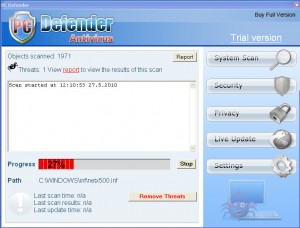 PC Defender Antivirus is another type of rogue anti-spyware program that you see all over the Web. It installs itself silently in the background when you visit infected sites and before you know it, you’ve now got a free fake malware scanner in your system. It will try to drown you with virus alerts saying your computer is infected with this of has detected so-and-so Trojan. This is so they can upsell you get the paid version of the app that will supposedly remove all your problems.
Don’t fall for it! Their promise is pure hokum and they will not fulfill that promise. Even if they do, their rogue app was the one that put those viruses there in the first place and more often than not, they are just fake files as well to complete the illusion.
Even though it might just be an annoying app, bear in mind that it is still a piece of malware and so needs to be eradicated immediately. Furthermore, software of this type often tinker with your system settings and registry, making you more vulnerable to attacks by other more harmful malware. Read on for more instructions on how to get rid of PC Defender Antivirus.
- Pothi
- July 4, 2010
- Comments Off
Read More


