
Sometimes it’s difficult to weed out the good programs from the bad. Especially nowadays with our access to the Internet and the large variety of programs that are available on it. If we ever need an app or program for a specific purpose, we often just jump on to Google and look up something that we need and just download it. The problem is that doing this is pretty unsafe.
A case in point would be, Antivirus 8. Sounds like one of the many versions of antivirii flying around, doesn’t it? But Antivirus 9 actually is a rogue security program. It’s similar to other fake security programs like Antivir 2010. What it does is get on to your computer via fake online scanners or trojan programs.
Once it is on your system, it will start sending out fake security alerts and notifying you about supposed infections on your computer. The main purpose of Antivirus 8 is to scare you into buying the programmer’s “antivirus” software, that will supposedly clean you “infection”.
The problem with that is, that it charges you an exorbitant $80 for the privilege. This is nothing more than a scam – so your best choice is to remove it ASAP. It may not be a threat on its own, but it disables legitimate antivirus programs from doing their own scans and that can be dangerous. To completely get it out of your PC, read more.
- Pothi
- September 29, 2010
- Comments Off
Read More

Keeping safe on the Internet can be a very difficult task. There are a lot of threats to your PC out there, and it can be very hard to keep your computer clean. One of the more infamous threats nowadays is the appearance of fake anti-spyware programs.
These pieces of malware pretend to be legitimate programs to defend your computer but are actually malware themselves. A prime example this is AVDefender 2011. Usually, trojans and fake online scanners promote this AVDefender as a way to keep your computer safe. If you didn’t know any better and downloaded it, you’ll be in for a lot of problems.
First of all, it will change your security settings to block legitimate anti-virus programs. This is to protect itself. Next, it will modify your settings so that it will always activate on start-up – where it will do a fake scan for viruses. This is fake because these infections do not exist – they’re just made up so that you would pony up the cash to buy the “full” version of AVDefender to remove these infections.
If you have this program on your system, be aware that it is malware and that you should remove it immediately. To find out what to do, read on.
- Pothi
- September 16, 2010
- Comments Off
Read More
 When you’re surfing the Internet, you often see a lot of ads for anti-virus/spyware programs. Sometimes, you may even click on them – when you need to find an anti-virus for your computer. However, that’s a pretty hit-or-miss tactic – and sometimes can be very dangerous for your computer and data.
This is because some of those ads can lead to fake anti-spyware programs and that’s a problem that you don’t want. Keeping away from such sites is not enough – trojans sometimes actively promote such software. A prime example of such programs is the AWM Antivirus.
The name may say ‘antivirus’, but don’t let that fool you – this program is as bad as any piece of malware out there. What it does once it infects your computer is to start up with fake malware scans to make you believe that your computer is infected. Then it offers to clean up your computer for a small fee – scaring you into paying. This is why most programs of this type are called “scareware”.
The problem with this is that even if you pay, this program is still there, so it continues doing these fake scans. It also disables other anti-spyware programs that may detect its presence. This makes it difficult to remove.
However, there’s a way to get rid of this piece of malicious programming. Read on for more info on how to do this..
- Pothi
- September 16, 2010
- Comments Off
Read More
 The Internet can be a very dangerous place. There are all sorts of threats that can put your computer and data under threat. One of these threats is the chance that you’ll get infected by malware. Of course, some people think that they’ll recognize that their PC is infected immediately or that their antivirus programs are enough – but rogue software programmers have gotten smarter through the years and they’ve cooked up a few tricks of their own. Nowadays, expect to face trouble fake anti-spyware – programs that pretend to be defending your computer from malware, but actually let them in.
One of these rogue anti-spyware programs is Spy Defender 2010. With a name like that you’d expect something to keep your computer safe. But what Spy Defender actually does is do fake malware scans on your computer. Of course, these scans will show that your computer is totally infested by malware and that you need to clean it out – Spy Defender 2010 says that it would do just that for a slight fee. Essentially, this program scares you into paying money to get rid of a nonexistent malware infection.
So how do you get it out of your system? Thankfully, there’s an easy way to do it. Read on for more information on what to do.
- Pothi
- September 16, 2010
- Comments Off
Read More
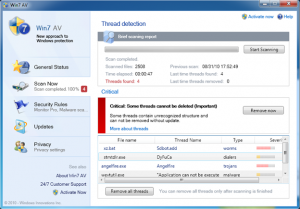 One of the dangers of surfing the Web is that sometimes we pick up things that we would rather not have on our computer. Trojans and malware are everywhere and if you’re not careful you might soon be the next victim of these malicious programs. One of the currently more infamous ones, is the Win7 AV. The name makes it sound legitimate but it is anything but. Win7 AV is a good example of fake anti-spyware; a program that pretends that it’s there to help you, but actually is the source of the problem.
What happens is a trojan manages to enter your computer in some way. After a while, you will start to get fake malware warning pages on your browser while you’re surfing the Internet. These messages often say that your computer is being attacked and that you need to get yourself upgraded immediately. Of course, normal users assume that this is a legitimate warning – after all, the warning looks pretty official, and people have a tendency to follow authority when they’re in trouble. This upgrade is, of course, the main Win7 AV program itself.
This program actually looks legitimate, with a fake Windows 7 style that gives it that authentic look. However, it is malware and it will mess around with your system and conduct false malware scans and then promoting malware that you have to download into your computer to ‘clean’ it. You’ll have to get rid of it. Thankfully, there’s an easy way to do it. Read on to find out more.
- Pothi
- September 16, 2010
- Comments Off
Read More

