
Uncategorized
Remove Warning Visiting This Site May Harm Your Computer Popup
 Some malware developers have mastered the art of deception so well, that it’s easy to fall for their trap. Take the case of the “Warning Visiting This Site May Harm Your Computer” popup.
A quick glance at the screenshot here will make you think it’s the legitimate warning from Google and Firefox which they created to detect harmful sites. But really, are they very similar? Only if you don’t look closely. The legitimate warning goes this way: “Reported Attack Site!” … then gives you the option to click a button that goes, “Get me out of here!” or another button that goes, “Why was this site blocked?”
The fake warning, however, starts with this message: “Warning! Visiting This Site May Harm Your Computer!”. Then the two buttons are replaced with “Continue unprotected” and “Get security software”, respectively. The layout, theme, color, icon, and fonts, however, look exactly the same as the original. Beware, because this one is fake.
If you click on the “Get security software” button that follows the “Warning! Visiting This Site May Harm Your Computer!” alert, you’ll be directed to a bogus website that will try to deceive you into revealing your credit card information.
How did this happen? Well, getting this fake warning only means warning - your computer’s security has just been breached.
Posted under Fake Antispyware | No Comments
Remove Warning Spyware Threat Has Been Detected On Your PC Popup
 Have you ever come across a “Warning Spyware Threat Has Been Detected On Your PC” popup? If the answer to this query is “yes”, then you’ll be happy you’ve landed on this page.
First, let me give you some bad news. Seeing a “Warning Spyware Threat Has Been Detected On Your PC” popup on your PC could only mean one thing - your PC is infected by a harmful piece of software. Now the good news - we’ve got solutions to this particular problem.
But before we talk about how you can remove “Warning Spyware Threat Has Been Detected On Your PC” popup, it would be helpful for you to know where you got this malware in the first place. Let me make a guess. You’re fond of downloading mp3s, video codecs, free antivirus, free system tools, or Flash player updates, aren’t you?
These little freebies may actually be trojans. Once inside your computer, these trojans will attack your Windows registry, install files, and run certain processes. Their most creative feature is launching popup alerts like the “Warning Spyware Threat Has Been Detected On Your PC” popup.
Clicking the popup may lead you to a rogue site. I don’t think I need to tell you that the rogue site can spell even more trouble.
Posted under Fake Antispyware | No Comments
Remove Warning Spyware Detected On Your Computer Popup
 Be wary of popup alerts that warn you of some sort of malware infection. Take for example the “Warning Spyware Detected On Your Computer” popup. The program that launched this particular popup is the malware itself. Strange for a malware to announce its presence, you say?
Well, not really. Besides, the popup won’t claim being the real threat. Instead, it will point to other threats (some even fictitious) as the culprits of the infection. That way, your attention will be directed away from it.
Alerts like the “Warning Spyware Detected On Your Computer” popup will actually try to entice you into purchasing an antivirus … a rather fake one, I might add. Developers of this fake antivirus are hoping you’ll be too scared of the popups, that you won’t be able to resist purchasing their antivirus.
The malware is usually introduced into your system through one of the most common ways malware find their way into computers - trojans. If you aren’t careful, the mp3, video codec, or device driver you download can actually be a trojan.
Well, once you start seeing those “Warning Spyware Detected On Your Computer”, it could only mean one thing - you’ve just downloaded a trojan and it’s time to take action.
Posted under Fake Antispyware | No Comments
Remove Your Computer Is Infected Popup
 Ah, so you’ve just encountered the “Your computer is infected!” popup and smell something fishy about it? Well, kudos to your vigilance because you’ve hit the bullseye.
The “Your computer is infected!” popup is definitely a symptom of a malware attack. You may have inadvertently installed a Trojan containing the malware when you were asked to install a Flash player update.
So if you haven’t clicked on that popup yet, then don’t even try. If you do, this treacherous program will direct you to a website that sells fake antivirus software. That antivirus program won’t do anything useful so you’ll end up spending your hard earned money.
Then as if that isn’t bad enough, since you’ll be most likely paying using your credit card, your credit card information will then be in the hands of wicked individuals. In most cases, they won’t be content with stealing your money. They can move on to stealing your identity as well.
Identity theft is a very serious headache that has left many individuals completely vulnerable. That helpful-looking “Your computer is infected!” popup could just be the start of a very disastrous future. Keep your future intact by getting rid of that deadly nuisance immediately.
Posted under Fake Antispyware | 1 Comment
Remove Your System Is Infected Popup
 Alarmed by a “Your system is infected!” popup that just appeared at the bottom-right corner of your screen? You ought to be. That popup is a trick used by the fake antivirus application AVCare. If you’d gullible enough to take that warning seriously, you could be in for a rude awakening.
Following that “Your system is infected!” popup will surely be a sales pitch urging you to purchase the “full version” of AVCare. Of course, since it’s a fake antivirus program, AVCare is a no good piece of software. Purchasing it would be just a waste of money.
Unfortunately, the developers of this scareware won’t stop with that. Once you reveal your credit card information during the transaction, these wicked individuals will squeeze it dry. That’s why I always remind our readers to avoid freebies on the Web. You’ll never know which ones have a hidden Trojan in them.
Video codecs, mp3’s, device drivers, Flash updates - they’re all possible carriers of Trojans. Then before you know it, you’ll be staring at a “Your system is infected!” popup. That means you’re system is already infected.
There’s no need to panic though. We’ve got ways to get rid of this threat.
Posted under Fake Antispyware | No Comments
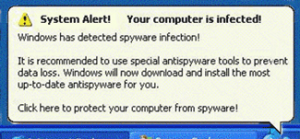
Remove Windows Has Detected Spyware Infection Popup
Is the “Windows Has Detected Spyware Infection!” popup a legitimate Windows alert? No sir, it isn’t. It’s just another ploy to dupe you into purchasing a useless “full version” of a fake antispyware program. This is what you get for being a sucker for Web freebies.
This “Windows Has Detected Spyware Infection!” popup looks very much like a genuine Windows alert (just look at the image and you’ll know what I mean), so many unsuspecting victims easily get fooled. To make the fake warning even more believable, the Trojan that installs this malware will create files in your Windows system folders so that when you conduct a search, you’ll find them there.
This will prompt you to believe the warning is for real. But it’s not.
If you do end up using your credit card to purchase the so-called full version, be prepared to face a string of problems. In a worst-case-scenario, you could end up being a victim of identity fraud. Now, you’ve got to agree: that’s one very serious problem.
Numerous individuals have lost all of their savings and more because of these types of scams. Don’t be a fool. Take action on that “Windows Has Detected Spyware Infection!” popup before it’s too late.
Posted under Fake Antispyware | No Comments
Remove APcDefender
 I really wonder why there have been lots of fake anti-spyware lately that specifically target French, English, Italian, and German victims. Well, there are and APcDefender is one of them.
APcDefender is a malware that relies on another to enter your system. You guessed it right … trojans! I would avoid downloading codecs, mp3s, Flash updates, or even drivers from relatively unknown websites. They’re usually the main sources of trojans.
If the trojan is successful, it will be able to launch the initial form of APcDefender. There’s another? Yup! We’ll get to that later. To set the stage for the ultimate form of APcDefender, the first will attack your Windows System Folders and Registry. This will be followed by a bombardment of pop-ups, notifications and other fake alerts. Some notifications may even warn you of imminent cyber attacks targeting your system.
All these are meant to persuade you to purchase a “full-version” of APcDefender. Yes, this is the ultimate form I mentioned earlier. The idea is that it is the only solution to all those pesky alerts. Naturally, this isn’t true. If you fall for it, you’ll be opening your gates to a massive invasion of malware … and there won’t be a PC defender to stop them.
Posted under Fake Antispyware | No Comments
Remove Guard Pro
 If you haven’t heard of Guard Pro yet, you better listen up because what we have to share with you about this treacherous piece of software may save you from a lot of hassle and unwarranted spending.
Guard Pro is just another fake anti-spyware that enters your system through sneaky trojans. Now, where would you most likely be able to download trojans from? You need not look very far actually. When was the last time you: installed a Flash plugin to play a free online game, downloaded a codec to view an illegally shared video, or availed of the services of a free online virus scanner?
These, my friend, are some of the typical sources of trojans. If you’re not sure of the credibility of the website you’re currently browsing, don’t download ANYTHING!!!
If you do, expect to be constantly pestered by security pop-ups and alerts, warning you of the presence of malware and enticing you to purchase a so-called “full version” of Guard Pro. What does it do? Absolutely zilch.
Well, more often than not, unsuspecting victims may have come across such sites AND downloaded the trojans BEFORE coming across this article. Does that mean you’re too late? Lucky for you, there’s still hope. If you follow our instructions, you can get rid of Guard Pro easily.
Posted under Fake Antispyware | No Comments
Remove SysProtector
 Are you a sucker for videos? If you are, beware! Some videos are just decoys to lure you into downloading codecs that are actually trojans. Once inside your system, these trojans then let loose dangerous programs like SysProtector.
SysProtector takes the form of a fake anti-spyware that eventually tries to dupe you into purchasing a “full-version” which is actually just a piece of software that does nothing useful.
Of course, SysProtector goes through certain processes to make the need for downloading this so-called “full-version” look genuine enough. You can bet that pop-ups and Windows alert notifications will be among its tricks. It will also create suspicious-sounding files in your Windows system folders, to which it will divert your attention later on in the pop-ups and notifications.
This is one dangerous, good-for-nothing malware because it will create entries in your Windows system registry. You’ll have to remove these entries to regain full control of your system.
After you’ve seen the pop-ups, notifications, and the files mentioned earlier, it would be hard for you to resist the urge to purchase the full version. Lucky for you, you came across this article. Otherwise, you would have ended up just like the others … swindled of their hard-earned dough. For what? Absolutely nothing.
Posted under Fake Antispyware | No Comments
Remove InSysSecure
 You know what kind of malware we’ve been seeing lately? Fake antispyware programs, like InSysSecure, that display alert notifications in various languages. There are four often-used languages on these notifications: German, English, French, and Italian. Hmmm. These villains might be employing the services of foreign crooks nowadays.
The reason is pretty obvious - the better to deceive a larger selection of victims.
While the notifications from InSysSecure are different from regular fake antispywares, the methods of getting into your system are the same: trojans! When was the last time you downloaded a flash update or a codec form an arbitrary source? Chances are, you’ve already downloaded InSysSecure or other rogue programs like it.
To gain the ability of launching pop-ups and notifications, InSysSecure will attack your Windows System Registry first. That way, it will have full control starting from boot up. Its main objective is typical of these fake antispyware programs - to entice you into buying its so-called “full-version”.
Beware, for if even the “trial version” is already dangerous, how much more for the “full-version”? Now, granting they’d be pretty much the same, surely you wouldn’t want to spend for any program that will only wreak havoc in your system!
Posted under Fake Antispyware | No Comments
 Spyware Doctor
Brought to you by PC Tools, one of the most trusted names in spyware
View More




