
Remove Thinkpoint Virus
Posted on October 27, 2010 by SpywareFix
 Nowadays, surfing the Internet is getting to be risky business. Not that it isn’t easy to do with a web browser – just type a URL and click or just go to Google to look up what you’re looking for. The risky part about it is that it’s becoming increasingly dangerous for your computer’s well-being. This is because of the widespread presence of malware and rogue programs on the Internet. It can be hard to keep your system safe from being infected by pieces of rogue software. They’ve become increasingly clever through the years and you need to be a little smart in your dealings on the Internet to make sure everything goes smoothly for you.
As an example, let’s take a look at an example of what you can expect to see in today’s malware environment. The Think Point virus is a very clever piece of scareware. What it does is to pretend that it is part of a Microsoft Windows Essential Security Alert and you should install it. Of course, the first instinct is to click on the pop-up telling you to do so. However, that wasn’t a real pop-up. Once you click on it, this malware installs itself into your system and does various things to inconvenience you, like block program access and the Internet. This piece of malware will pretend that it has detected viruses that can only be cleaned using Think Point – a program that it’s selling. It’s a scam, pure and simple, and you’ll need to get rid of Think Point as quickly as possible. To learn the steps on how you can do this, just continue reading.
Posted under Fake Antispyware | No Comments
Remove Antivirus Action
Posted on October 18, 2010 by SpywareFix
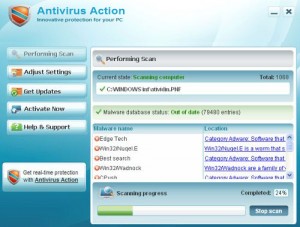 When you’re surfing the Internet, you’re often unaware of a lot of the hidden dangers that abound in cyberspace. The problem is that a lot of these dangers come in forms that an unsuspecting person would not be expecting. The most prevalent problem is the risk of being infected by a malware or some computer virus. These programs try their best to get into your computer’s defenses by masquerading as something else.
Take for example, Antivirus Action, one of the more virulent pieces of malware recently discovered. It enters a system by either pretending to be a video codec or through an online virus scanner. Then it starts to wreak havoc on your PC.
First of all, Antivirus Action bombards you with fake security alerts, advising you to buy the full version so as to remove the “infection”. These alerts are all fake and buying the full version will just lose you money.
But the biggest problem that Antivirus Action can do is that it can block all of your other real antivirus programs, disrupt your net connection, and worst of all, let other viruses in. This is why having this particular piece of malware on your system is a big problem and you should remove it immediately. To find out how to completely rid your system of Antivirus Action, read on.
Posted under Fake Antispyware | No Comments
Remove Antivirus IS
Posted on October 18, 2010 by SpywareFix
 When you’re surfing on the Internet nowadays, you need to be a bit wary. This is because of the many hidden dangers that can spell trouble for you and your computer. One of the foremost problems that you are probably going to encounter is malware. If you aren’t careful, these pieces of rogue software can sneak into your system and give you headaches until you manage to remove them.
A good example of the typical malware program nowadays is Antivirus IS. What it does is execute fake “virus” scans and send you fake “alerts” telling you that your computer is infected with a large amount of “viruses”. It then offers to clean all these “viruses” off of your PC, if you pay a simple fee of $90. You don’t need me to tell you that the price is exorbitant when you can easily check and see that legitimate antiviruses cost $50 at most.
However, that’s just the beginning – Antivirus IS will also stop other antivirus programs you have from working. This program will also hijack your browser and constantly send you messages that you’re browsing unsafely. It will also block you from any processes that will help you remove it from your system like the registry editor, task manager and system restore.
As you can see, this piece of scareware is definite troublemaker. To find out how to remove it from your system, you’ll have to read on.
Posted under Fake Antispyware | No Comments
Remove Antivirus Studio
Posted on October 18, 2010 by SpywareFix
 Keeping your computer safe nowadays is very important. This is because a lot of important pieces of data can be found on our computers – we use it for work, for leisure and other things. That is why protecting our PCs safe from possible threats is a number one priority. The problem is that, with the fast pace of technology, the threats seem to be coming from everywhere.
The Internet, one of the biggest reasons that people use their computers, also happens to be the main culprit of these problems. Viruses and malware abound on the Internet, waiting for the unwary browser to stumble into them.
One of these pieces of rogue software is Antivirus Studio. To an unsuspecting user, this malware may look like a legitimate piece of antivirus software. However, the truth is Antivirus Studio is a piece of scareware that aims to frighten the owner of a system that his PC is hopelessly infected and he needs to pay $90 to clean the virus infection and for lifetime support.
This is a complete lie, though. What Antivirus Studio does is do fake virus scans to send out “alerts” that tell you your computer is hopelessly infested. It also hijacks your computer so that it can turn off your other antivirus programs and changes your Task Manager window to show supposedly “virus” processes. It also stops your net browsing by saying your Internet connection is not secure.
Antivirus Studio needs to be removed immediately and you need to be thorough; that way it won’t be able to come back. To find out how to do this, read on.
Posted under Fake Antispyware | No Comments
Remove Smart Engine
Posted on October 18, 2010 by SpywareFix
 The Internet has become a large part of our daily life. What was once the province of tech geeks is now a regular source of information and entertainment for most parts of the world. This is a great thing since this can only mean great things in the future as information gets spread faster around the world.
The problem is, as to all things, there are good and bad points. The Internet has also become the greatest source of possible threats to your computer. Malware can be found on a lot of sites on the Internet and if you’re not careful, you can be a victim of these pieces of rogue software.
A good example of this is the rogue anti-spyware program called Smart Engine. What this program does is make you doubt in the security of your computer. What it does is start showing popup advising you that your PC has been infected by Trojans – even though your other antivirus programs haven’t detected anything.
Smart Engine will then try to sell you its “full” version that will supposedly “clean” your system for $49.95. That’s just for the six-month subscription. The price gets higher for the one-year and lifetime subscription, $69.95 and $89.95 respectively.
Don’t believe it – it’s just a scam to scare you into buying their product! Smart Engine is the actual malware here and you need to get it out of your system fast. To find out how, read on.
Posted under Fake Antispyware | No Comments
Remove Antivirus 8
Posted on September 29, 2010 by SpywareFix

Sometimes it’s difficult to weed out the good programs from the bad. Especially nowadays with our access to the Internet and the large variety of programs that are available on it. If we ever need an app or program for a specific purpose, we often just jump on to Google and look up something that we need and just download it. The problem is that doing this is pretty unsafe.
A case in point would be, Antivirus 8. Sounds like one of the many versions of antivirii flying around, doesn’t it? But Antivirus 9 actually is a rogue security program. It’s similar to other fake security programs like Antivir 2010. What it does is get on to your computer via fake online scanners or trojan programs.
Once it is on your system, it will start sending out fake security alerts and notifying you about supposed infections on your computer. The main purpose of Antivirus 8 is to scare you into buying the programmer’s “antivirus” software, that will supposedly clean you “infection”.
The problem with that is, that it charges you an exorbitant $80 for the privilege. This is nothing more than a scam – so your best choice is to remove it ASAP. It may not be a threat on its own, but it disables legitimate antivirus programs from doing their own scans and that can be dangerous. To completely get it out of your PC, read more.
Posted under Fake Antispyware | No Comments
Remove AVDefender 2011
Posted on September 16, 2010 by SpywareFix

Keeping safe on the Internet can be a very difficult task. There are a lot of threats to your PC out there, and it can be very hard to keep your computer clean. One of the more infamous threats nowadays is the appearance of fake anti-spyware programs.
These pieces of malware pretend to be legitimate programs to defend your computer but are actually malware themselves. A prime example this is AVDefender 2011. Usually, trojans and fake online scanners promote this AVDefender as a way to keep your computer safe. If you didn’t know any better and downloaded it, you’ll be in for a lot of problems.
First of all, it will change your security settings to block legitimate anti-virus programs. This is to protect itself. Next, it will modify your settings so that it will always activate on start-up – where it will do a fake scan for viruses. This is fake because these infections do not exist – they’re just made up so that you would pony up the cash to buy the “full” version of AVDefender to remove these infections.
If you have this program on your system, be aware that it is malware and that you should remove it immediately. To find out what to do, read on.
Posted under Fake Antispyware | No Comments
Remove AWM Antivirus
Posted on September 16, 2010 by SpywareFix
 When you’re surfing the Internet, you often see a lot of ads for anti-virus/spyware programs. Sometimes, you may even click on them – when you need to find an anti-virus for your computer. However, that’s a pretty hit-or-miss tactic – and sometimes can be very dangerous for your computer and data.
This is because some of those ads can lead to fake anti-spyware programs and that’s a problem that you don’t want. Keeping away from such sites is not enough – trojans sometimes actively promote such software. A prime example of such programs is the AWM Antivirus.
The name may say ‘antivirus’, but don’t let that fool you – this program is as bad as any piece of malware out there. What it does once it infects your computer is to start up with fake malware scans to make you believe that your computer is infected. Then it offers to clean up your computer for a small fee – scaring you into paying. This is why most programs of this type are called “scareware”.
The problem with this is that even if you pay, this program is still there, so it continues doing these fake scans. It also disables other anti-spyware programs that may detect its presence. This makes it difficult to remove.
However, there’s a way to get rid of this piece of malicious programming. Read on for more info on how to do this..
Posted under Fake Antispyware | No Comments
Remove Spy Defender 2010
Posted on September 16, 2010 by SpywareFix
 The Internet can be a very dangerous place. There are all sorts of threats that can put your computer and data under threat. One of these threats is the chance that you’ll get infected by malware. Of course, some people think that they’ll recognize that their PC is infected immediately or that their antivirus programs are enough – but rogue software programmers have gotten smarter through the years and they’ve cooked up a few tricks of their own. Nowadays, expect to face trouble fake anti-spyware – programs that pretend to be defending your computer from malware, but actually let them in.
One of these rogue anti-spyware programs is Spy Defender 2010. With a name like that you’d expect something to keep your computer safe. But what Spy Defender actually does is do fake malware scans on your computer. Of course, these scans will show that your computer is totally infested by malware and that you need to clean it out – Spy Defender 2010 says that it would do just that for a slight fee. Essentially, this program scares you into paying money to get rid of a nonexistent malware infection.
So how do you get it out of your system? Thankfully, there’s an easy way to do it. Read on for more information on what to do.
Posted under Fake Antispyware | No Comments
Remove Win7 AV
Posted on September 16, 2010 by SpywareFix
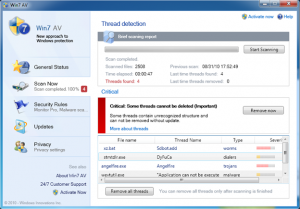 One of the dangers of surfing the Web is that sometimes we pick up things that we would rather not have on our computer. Trojans and malware are everywhere and if you’re not careful you might soon be the next victim of these malicious programs. One of the currently more infamous ones, is the Win7 AV. The name makes it sound legitimate but it is anything but. Win7 AV is a good example of fake anti-spyware; a program that pretends that it’s there to help you, but actually is the source of the problem.
What happens is a trojan manages to enter your computer in some way. After a while, you will start to get fake malware warning pages on your browser while you’re surfing the Internet. These messages often say that your computer is being attacked and that you need to get yourself upgraded immediately. Of course, normal users assume that this is a legitimate warning – after all, the warning looks pretty official, and people have a tendency to follow authority when they’re in trouble. This upgrade is, of course, the main Win7 AV program itself.
This program actually looks legitimate, with a fake Windows 7 style that gives it that authentic look. However, it is malware and it will mess around with your system and conduct false malware scans and then promoting malware that you have to download into your computer to ‘clean’ it. You’ll have to get rid of it. Thankfully, there’s an easy way to do it. Read on to find out more.
Posted under Fake Antispyware | No Comments





