
Remove AV Security Suite
Posted on June 15, 2010 by SpywareFix
 AV Security Suite is yet another rogue anti-spyware program you need to watch out for. It does the usual scareware stuff of serving up virus scan results by putting fake files into your computer that it cries wolf about and points as malware. It’s all a deception though since these files are harmless and they are merely wanting you to swipe your credit card (or the online equivalent of that) and send some cash their way. They won’t actually fix anything and just preying on your fears.
Probably the more dangerous thing about this software is that it will block access to legitimate software, crippling your PC. It will also hijack your Internet Explorer and change the settings so that it routes information through a proxy server that might serve up more malware to your computer.
You will need to reverse the changes done in Internet Explorer by this nasty malware as well as boot in Safe Mode in order to wipe your system clean of all traces of AV Security Suite. Failure to do so might lead to loss of data, system instability even complete failure of your PC. Follow our easy guide on how to remove this fake anti-spyware from your computer and leave the actual scanning and virus cleaning to legitimate anti-virus apps.
Posted under Fake Antispyware | 15 Comments
Remove Protection Center
Posted on June 3, 2010 by SpywareFix
 As if the current number of rogue anti-spyware out there isn’t bad enough, here comes another threat that goes by the name Protection Center. Like all scareware of its ilk, it will frighten you with all sorts of virus pop-ups, network attack alerts and virus scans that show all sorts of nasty stuff on your PC. The only way to stop it, supposedly, is to pay up for the upgraded version. A piece of advice: don’t pay for it!
All the scans, alerts and others are just a scam to separate you from your money. It’s all smoke and mirrors with fake programs planted in your systems to mimic virus files. Beyond not giving these people your cash, you should go ahead and remove this badware from your system immediately. If it could get in your computer, what’s stopping other malware from doing the same?
Bear in mind though that this one is pretty tricky to remove as it disables many of the security features in your computer. You need to boot into Safe Mode with Networking to be able to get rid of this infection once and for all. Read on for more instructions on how to rid yourself of Protection Center.
Posted under Fake Antispyware | No Comments
Remove Security Master AV
Posted on May 31, 2010 by SpywareFix
 One day, you open your computer and find that you have a brand new anti-spyware app called Security Master AV. While wondering who installed it, suddenly it flashes a virus alert! “Warning! Virus detected” Another pop-up it might sprout is “Warning! Identity theft attempt detected” Oh no! You computer is infected!
As far as infections, don’t worry. Security Master AV was the one that put those viruses there and they are all fakes. It’s all part of the ploy of scareware programs like this one that are tapping into our fear centers so that we will buy their bogus product. If you are thinking of handing your credit card details to these fraudsters, don’t! You’re paying for worthless junk and need to uninstall this rogue anti-spyware right away.
The program is wily enough to shut down your computer’s security features and can hijack your browsers when you try to go to a security website. It might even cut off your ability to install new AV software. This just makes it more important that you remove this since with your security down, other intruders like Trojans and worms will be able to get in your computer unhindered. Follow our guide on how to remove this nasty software from your PC.
Posted under Fake Antispyware | 17 Comments
Remove AKM Antivirus Pro 2010
Posted on May 26, 2010 by SpywareFix
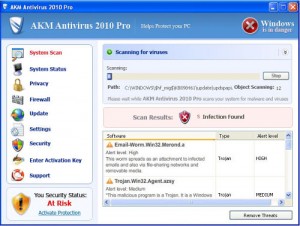
There are many scams out there in the Internet but nothing beats scareware like AKM Antivirus 2010 Pro. Essentially, what it does is it sneaks inside your computer and throws up frightening virus alerts and shocking pop-ups that your computer is infected. These are all fake, of course, and are designed for maximum shock value. Through all that, it will ask you to pay for a full version of their fake scare app. Some even have the gall to ask you to donate instead of paying.
After you calm down, you will find out that it still shows pop-ups and that they’ve run out and left with your money. Before this happens, you better remove this fake anti-spyware app before it brings more ruin to your PC. Some of the ways it can cripple your computer are by slowing down its processes, using up precious disk space, stealing and/or replacing important files and using up your bandwidth to spread itself to others via email, IM and other social media. Don’t let on program destroy your entire system!
Remove this rogue software easily and hassle-free through our instructions below. You might need to register it using this code to unblock spyware removal apps: threedollarbillyall. Read on for more.
Posted under Fake Antispyware | No Comments
Remove XJR Antivirus
Posted on May 26, 2010 by SpywareFix
 XJR Antivirus is one program you should definitely avoid. It’s a type of malware that disguises itself as a friendly anti-spyware app. You will find out that it’s not all it seems to be. It will flood your computer with fake virus alerts, block your other antivirus programs and will ask you to upgrade to a paid version every instance it can.
Suffice it to day that you should not buy this rogue anti-malware app. Do not send your credit card details to them!
While many rogue anti-spyware applications are benign, they do highlight the vulnerabilities of your computer to outside parties. It’s like locking all the doors in your house but leaving the bathroom window open. No matter how small the entrance, Trojans and worms will still be able to exploit that weakness and ran amok inside your system. You can potentially lose not just the contents of your computer but the machine itself can be rendered inoperable. Don’t let yourself fall prey to hackers and digital thieves!
There are several ways to fix this problem, from reformatting to buying a new system altogether. The best alternative we found is shown below which is easy and won’t break the bank. Read on for the instructions.
Posted under Fake Antispyware | No Comments
Remove Microsoft Security Essentials Fake
Posted on May 12, 2010 by SpywareFix
 People trust Microsoft. After all, they make the operating system they work on everyday, Windows. A Russian team of hackers are using this trust and turning it around by hijacking Microsoft’s own trademarked name, Microsoft Security Essentials, and using it for their own rogue software.
Sure, you wouldn’t really know if it’s fake by the name but if it asks for registration via SMS better ignore it and remove this malware right away. The original Microsoft Security Essentials is free but this version will constantly prompt you to upgrade, so that is another red flag for you. While masquerading as a security app, it will be able to steal information from your computer that can open it up to illegal and illicit activity from hackers. They can pick up your credit card information, passwords and even your address book and spread the infection to your relatives and friends.
Make sure to remove this badware immediately and replace it with the completely free and original version from Microsoft’s own site. It costs nothing and works pretty well. It also does not need any SMS registration and will work with any genuine Microsoft product. Here are the instructions on how to clean your computer from the fake Microsoft Security Essentials.
Posted under Fake Antispyware | No Comments
Remove Adware Scanner 2010
Posted on May 12, 2010 by SpywareFix
 It’s a common thing to see ads in websites though some websites do install adware to track your activity more closely. It’s a privacy breach for sure but there are legitimate tools, like browser add-ons and extensions, that let you skirt around these. A few malware makers saw this as an opportunity and ventured out into another new product by making the rogue software called Adware Scanner 2010.
While it touts itself as an adware scanner, it is far from it. It is quite the opposite actually and hijacks browsers and redirects the websites to display ads for other rogue programs. It will alert you to adware, spyware and malware but these are all fakes so don’t pay them any attention. The true malware is Adware Scanner 2010 and you need to remove it right away to avoid further malware problems down the road.
If it prompts you for an upgrade, don’t purchase it! It will be like giving your ATM card and PIN to a known criminal. If you really need an adware scanner, there are a lot of legitimate ones that are even endorsed by Mozilla, Microsoft and Google. Go ahead and read on below for the fixes you can do to wipe out this infection from your computer system.
Posted under Fake Antispyware | No Comments
Remove Total PC Defender 2010
Posted on May 12, 2010 by SpywareFix
 There are plenty of legitimate security applications out there but once in a while a sneaky rogue anti-spyware app like Total PC Defender 2010 (also known as TotalPCDefender2010) gets in your computer. This malware often rides into your machine via questionable file downloads and mislabeled links so it can infect your computer and compromise it. After installing itself, you will notice that your PC is suddenly sprouting alerts left and right, saying you have a virus infection in your system.
When you check, you see something that looks like a real anti-spyware program but rest assured it is not. Its goal is to scare you into buying a “full license” for the software but won’t give you anything in return. It will do anything to this end including virus alerts and claims that malware cannot be removed without a full program. There is only one thing you should do in this case: don’t buy it!
The next question now is how do I remove this? You may opt to just spend your hard-earned cash to have it fixed by a technician. Or you can go the hard route and just reinstall everything from scratch. There’s a better way though. Read on to find out.
Posted under Fake Antispyware | No Comments
Remove RST Antivirus 2010 Pro
Posted on May 12, 2010 by SpywareFix
 RST Antivirus 2010 Pro is yet another rogue anti-spyware app that you should watch out for. Like other programs set to scam you out of your money, this program will use virus pop-ups and scare tactics to get you to purchase their “paid upgrade”. Don’t! Buying it won’t solve your malware problem and worse, you’ve handed over your credit card details to a potential criminal entity.
Other possible problems you may face when getting infected with RST Antivirus 2010 Pro are computer freezes, sudden restarts, malfunctioning keys, loss of free disk space, browsers getting redirected to illicit sites and programs not launching properly. You can also lose more than your computer to this malware since it can let in other Trojans, worms and viruses that can potentially wreck havoc to your social networking accounts, personal and professional websites and online bank accounts.
You will need to remove this software as soon as possible to prevent future attacks on your computer from happening. After cleaning up, remember to be wary of strange offers and messages that show up in your web browser, email, Twitter and instant messages. And always scan your computer for malware regularly.
Posted under Fake Antispyware | No Comments
Remove Data Protection
Posted on May 12, 2010 by SpywareFix
 Data Protection is one of the nastier rogue anti-spyware apps out there. It secretly installs itself in your system and tries to uninstall your security programs as well. It will also block new installations of these antivirus and anti-spyware applications, making it difficult to clean from your machine. It doesn’t end there; Data Protection will also stop you from using Windows Task Manager and Registry Editor making it almost unremovable.
The main reason why you need to remove it is that it is a potential hazard to your data. It hijacks your web browser to display ads and porn sites, which can lead to more infections later on. Hackers will be able to get into your computer through the loopholes it creates in your system. It also will constantly send our virus alert messages to entice you to upgrade to a “paid” version. Do not buy it! If you have, call your credit card company and dispute the charges.
Don’t be complacent, you will need to remove this fake anti-spyware as soon as possible. If you do not, you might not be able to recover your computer when it crashes and lose all the data in it. Below are a few simple steps you can follow to eradicate this bad piece of software.
Posted under Fake Antispyware | No Comments





