
Remove Win 7 Guardian 2010
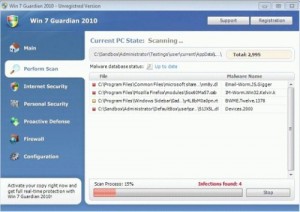 Win 7 Guardian 2010 is a fake anti-spyware application that silently installs itself through other malware infections. It will constantly flash a pop-up screen to show some fake system scan results and force you to purchase an upgrade to remove the viruses it supposedly finds.
You have to remove this rogue software immediately! It will start up every time you boot your computer. Additionally, it will change your security settings and registry to prevent you from removing it. If you do not clean your computer to get rid of this malware, it will leave your computer vulnerable to attacks and malicious hackers might use your computer for illegal and questionable activities.
If you think your computer has Win 7 Guardian 2010, ignore any alerts it might show which mimic Windows Security Center or Windows Task Manager announcements. These are all fake. Do not buy anything it offers to sell you since your credit card details might get stolen if you do so. Most importantly, choose a trusted antivirus to clean your computer and remove all traces of this fake software.
Symptoms Of Infection
- Your computer is acting slow. Win 7 Guardian 2010 slows down your system significantly. This includes starting up, shutting down, playing games, and surfing the web.
- You are getting pestered with pop ups. Win 7 Guardian 2010 infects your registry and uses it to launch annoying pop up ads out of nowhere.
- Searches are redirected or your homepage and desktop are settings are changed. This is a symptom of a very serious Win 7 Guardian 2010 infection.
Dangers Of Infection
 Viruses like Win 7 Guardian 2010 will infect your registry and other important system files. If the infection is not treated it can cause a complete collapse of your system.
Some Win 7 Guardian 2010 infections contain spyware and keyloggers which can be used to record sensitive data like passwords, credit card, bank account, and social security numbers. The longer you allow the infection to fester, the greater the chance of identity fraud.
How To Remove Infection Manually
Uninstall Win 7 Guardian 2010 Processes
Delete Win 7 Guardian 2010 Files
%UserProfile%\AppData\Local\WRblt8464P
Remove Win 7 Guardian 2010 Registry Files
HKEY_CURRENT_USER\Software\Classes\secfile\shell\open\command “(Default)” = “av.exe” /START “%1? %*
HKEY_CLASSES_ROOT\.exe\shell\open\command “(Default)” = “av.exe” /START “%1? %*
HKEY_CLASSES_ROOT\secfile\shell\open\command “(Default)” = “av.exe” /START “%1? %*
HKEY_LOCAL_MACHINE\SOFTWARE\Clients\StartMenuInternet\FIREFOX.EXE\shell\open\command “(Default)” = “av.exe” /START “firefox.exe”
HKEY_LOCAL_MACHINE\SOFTWARE\Clients\StartMenuInternet\FIREFOX.EXE\shell\safemode\command “(Default)” = “av.exe” /START “firefox.exe” -safe-mode
HKEY_LOCAL_MACHINE\SOFTWARE\Clients\StartMenuInternet\IEXPLORE.EXE\shell\open\command “(Default)” = “av.exe” /START “iexplore.exe”
HKEY_LOCAL_MACHINE\SOFTWARE\Microsoft\Security Center “AntiVirusOverride” = “1?
HKEY_LOCAL_MACHINE\SOFTWARE\Microsoft\Security Center “FirewallOverride” = “1?
Popular Search Terms
Remove Win 7 Guardian 2010
Delete Win 7 Guardian 2010
Uninstall Win 7 Guardian 2010
How to get rid of Win 7 Guardian 2010
How to remove Win 7 Guardian 2010
Win 7 Guardian 2010 removal
Remove Win7Guardian2010
Win7Guardian2010 removal
Win-7-Guardian-2010
Warning! If Spyware Doctor is blocked by the virus then run your system in safe mode and try again. To do this reboot your system and tap F8 repeatedly as your computer starts up. Then run Spyware Doctor as normal. If this doesn’t work try renaming the Spyware Doctor EXE file.
